🍕 What is the cheapest scraping tool to get Google Maps data? And does it work well?

Joseph Contesse
Auteur
"In pizza we trust, but in data we verify." 🍕
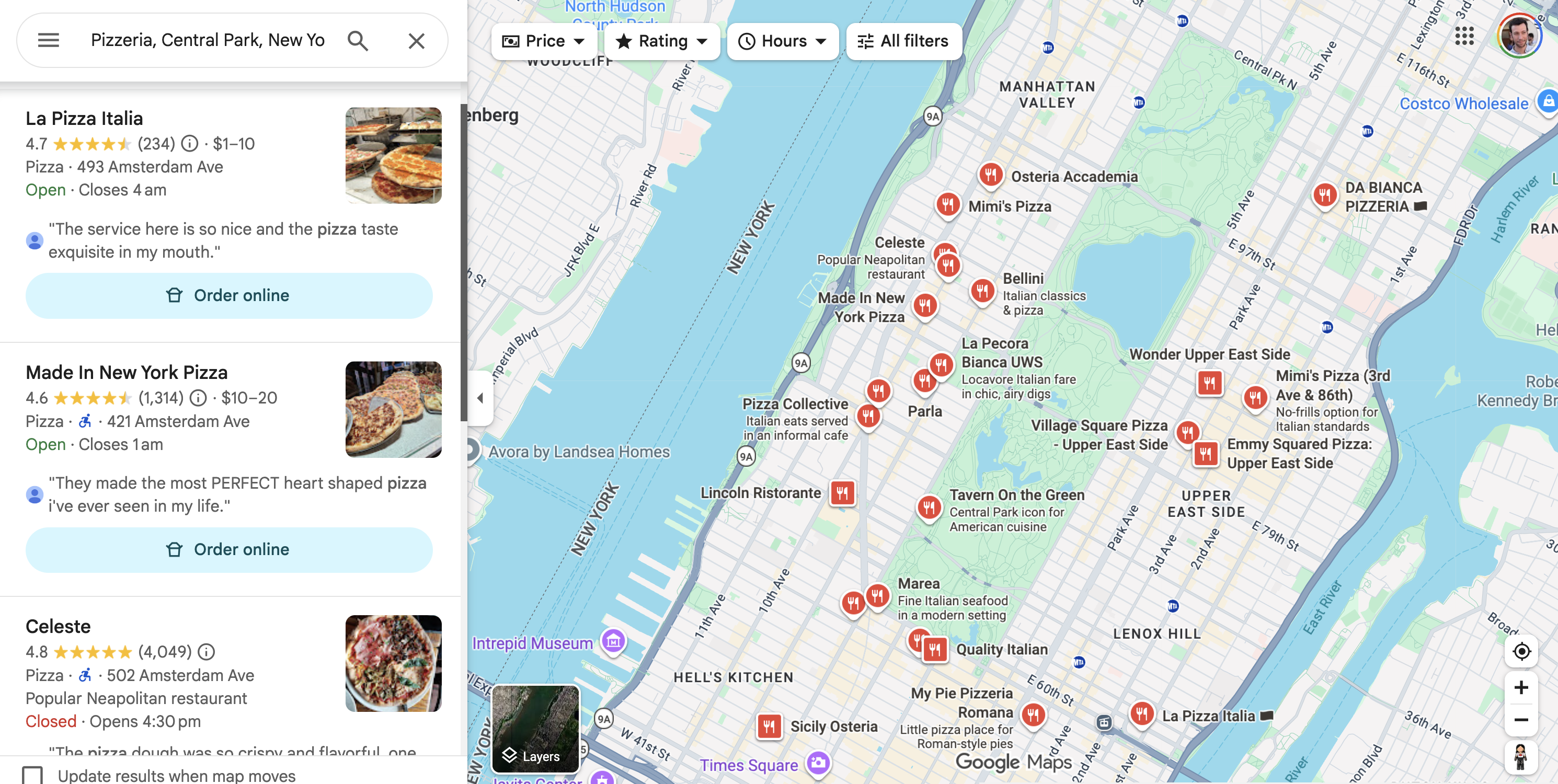
To find the absolute best and most budget-friendly Google Maps scraping tools on the market, we decided to run a real-world stress test. And what better way to test them than pulling live data on pizzerias surrounding New York’s Central Park? (Yes, we really love pizza, but we love clean data even more).
We put the top solutions head-to-head. No marketing bla-bla here: To build our benchmark, we will take four factors into account: price, data completeness, scraping time, and the existence of a pay-as-you-go option, which allows you to use the solutions without a subscription by only paying for what you need. As you can imagine, pay-as-you-go can be incredibly useful when you want to keep costs as low as possible. Conversely, a subscription you might forget about can be quite a pain. To conduct our comparison, we will base our evaluation on the entry-level plans of each solution—meaning the cheapest available option (excluding free trials).
We searched for the cheapest Google Maps scraping solutions: Searchapi, Outscraper, APify, Phantombuster and ourself: Openscraper.
Now, we are going to measure their actual cost and test them to ensure they work properly, delivering complete results with no missing data for this URL. Google Maps results can vary from one user to another, so we will check if they come close (within 20 results) to the result we found manually: 121 places.
_(Bonus: We've included the API scripts for our top three solutions, along with all the raw CSVs, so you can test them yourself and check if the data meets your needs!) ⚙️🎁_
The test
1. OpenScraper

- • Pricing: Starts at $0.29 per 1,000 places and $0.089 per 1,000 reviews. A "Super User" subscription (starting at $70 per month) offers a 10% discount. In addition it has a pay-as-you go plan.
- • Free Plan: $5 in free credits upon signing up.
- • Extra-features: Includes advanced features like crawling business websites for contact or social networks info.
Note that OpenScraper is also the only solution along with Outscraper that lets you top up your account with whatever amount you want, allowing you to pay strictly for what you need without spending an extra dollar or euro. This is the well-known "Pay-as-you-go" model.
So yes, the SaaS interface is less exhaustive than others in terms of settings and is very "API-first," but writing a quick script is all it takes to make it work wonders. Which is very easy to do with ChatGPT.
Since we want you to be able to see the results for yourself, I am sharing the script I used for the test, which saves the results as a CSV. Just make sure to replace "YOUR_API_KEY" with your actual API key!
import requests
import csv
import os
import json
import time

# Start the timer
start_time = time.time()

response = requests.post(
    "https://api.openscraper.ai/runs",
    headers={"Authorization": "Bearer VOTRE_CLE_API"},
    json={
        "module": "googlemaps_matrix",
        "params": {
            "url": "https://www.google.com/maps/search/Pizzeria,+Central+Park,+New+York,+New+York+State/@40.7795718,-73.9884523,14z/data=!4m2!2m1!6e5?entry=ttu&g_ep=EgoyMDI2MDcwOC4wIKXMDSoASAFQAw%3D%3D",
            "language": "English (United States)",
            "country": "United States",
            "ratings": "Any rating",
            "details": False,
            "images": False,
            "collect_contacts": True,
            "max_results": 140,
            "ui_strict": True,
        },
        "sync": True,
        "sync_timeout_seconds": 120,
    },
    timeout=180,
)
response.raise_for_status()
data = response.json()

# Build an absolute path to ensure we write to the correct directory
script_dir = os.path.dirname(os.path.realpath(__file__))
json_output_filename = os.path.join(script_dir, "openscraper_results.json")
with open(json_output_filename, "w", encoding="utf-8") as f:
    json.dump(data, f, indent=4, ensure_ascii=False)
print(f"The full JSON response has been saved to '{json_output_filename}'")

# To ensure consistency, we will read the JSON file we just saved
with open(json_output_filename, 'r', encoding='utf-8') as f:
    saved_data = json.load(f)

results = saved_data.get("result") or []

if results:
    output_filename = os.path.join(script_dir, "openscraper_results.csv")

    all_keys = set()
    for place in results:
        all_keys.update(place.keys())
    fieldnames = sorted(list(all_keys))

    with open(output_filename, 'w', newline='', encoding='utf-8-sig') as csvfile:
        writer = csv.DictWriter(csvfile, fieldnames=fieldnames, restval='', quoting=csv.QUOTE_ALL)
        writer.writeheader()
        writer.writerows(results)

    print(f"{len(results)} results with {len(fieldnames)} columns were saved to '{output_filename}'")
else:
    print("No results were found.")

end_time = time.time()
print(f"Script finished in {end_time - start_time:.2f} seconds.")
Check out and download the CSV test results with all the data and fields: Download CSV.
💚 What we liked:
- •The cheapest by far
- •Pay-as-you-go option
- •A simple interface
💔 What could be improved:
- •No localization by city, state/department, or country yet
- •Usage outside the API remains limited for now
2. Coreclaw

- • Pricing: Pricing starts at $3 /month. You get $3 credits. Then you spend it at $0.0018 per location.
- • Free Plan: $3 on signup.
- • Extra-features: Contact & Social enrichment, Review scraped, Email verification
Coreclaw comes in with a price tag of $0.0018 per location, tying it for second place on pure affordability. While that rate is fair compared to the broader market, it is still 6 times more expensive than OpenScraper ($0.00029/location).
What helps offset that price is its out-of-the-box feature set. Coreclaw includes several value-add features for free that most competitors charge extra for:
Contact & social extraction: Automatically scrapes emails, phone numbers, and social profiles (Facebook, Instagram, YouTube, TikTok, LinkedIn) directly from business websites.
Email validation: Verifies extracted emails and assigns status tags (valid, invalid, disposable, catch-all, unknown, error) with smart business email detection.
Where it falls short: Speed and precision.
Coreclaw took a lengthy 131.85 seconds to run, making it the second slowest tool in our test. More concerningly, it returned 180 results—a suspiciously high count given that a manual Google Maps search yields around 121 places.

And here is the script used for the test (Again, replace "YOUR_API_KEY" with your actual API key!):
#!/usr/bin/env python3
import requests
import json
import time
import csv
import os
from typing import Dict, Any

# API URL
API_BASE_URL = "https://openapi.coreclaw.com/api/v2"
WORKER_ID = "01KPD6M5YQADCQKGVKPDZVYC63"
RUN_URL = f"{API_BASE_URL}/workers/{WORKER_ID}/runs"

# Your API TOKEN
API_TOKEN = "YOUR_API_KEY"

# Request timeout (seconds)
TIMEOUT = 220

def run_scraper(params: Dict[str, Any], api_token: str) -> Dict[str, Any]:
    headers = {
        "Authorization": "Bearer " + api_token,
        "Content-Type": "application/json"
    }

    try:
        # Send POST request
        response = requests.post(
            RUN_URL,
            headers=headers,
            json=params,
            timeout=TIMEOUT
        )

        # Check HTTP status code
        if response.status_code != 200:
            return {
                "success": False,
                "run_slug": None,
                "error": f"HTTP error: {response.status_code} - {response.text}"
            }

        # Parse response
        result = response.json()

        # Check business error code
        if result.get("code") != 0:
            return {
                "success": False,
                "run_slug": None,
                "error": f"Business error: {result.get('message', 'Unknown error')} (code: {result.get('code')})"
            }

        # Return success result
        return {
            "success": True,
            "run_slug": result.get("data", {}).get("run_slug"),
            "error": None
        }

    except requests.exceptions.Timeout:
        return {
            "success": False,
            "run_slug": None,
            "error": f"Request timeout after {TIMEOUT} seconds"
        }
    except requests.exceptions.RequestException as e:
        return {
            "success": False,
            "run_slug": None,
            "error": f"Request error: {str(e)}"
        }
    except json.JSONDecodeError as e:
        return {
            "success": False,
            "run_slug": None,
            "error": f"JSON decode error: {str(e)}"
        }

def get_run_results(run_slug: str, api_token: str) -> Dict[str, Any]:
    """Polls the API to get the status, and fetches results once completed."""
    status_url = f"{API_BASE_URL}/worker-runs/{run_slug}?page_size=100"
    result_url = f"{API_BASE_URL}/worker-runs/{run_slug}/result"
    headers = {"Authorization": "Bearer " + api_token}

    while True:
        print("Checking run status...")
        try:
            # 1. Vérification du statut de l'exécution
            response = requests.get(status_url, headers=headers, timeout=TIMEOUT)
            response.raise_for_status()
            result = response.json()

            if result.get("code") != 0:
                return {"success": False, "data": None, "error": f"API error: {result.get('message')}"}

            status = result.get("data", {}).get("status")
            print(f"Current status: {status}")

            if status in ["completed", "succeeded"]:
                print("Run completed! Fetching results...")
                all_results = []
                page_index = 1
                while True:
                    print(f"Fetching page {page_index}...")
                    # 2. Récupération des résultats sur l'endpoint de résultat dédié avec pagination
                    paginated_result_url = f"{result_url}?page_index={page_index}&page_size=100"
                    res_response = requests.get(paginated_result_url, headers=headers, timeout=TIMEOUT)
                    res_response.raise_for_status()
                    res_result = res_response.json()

                    if res_result.get("code") != 0:
                        return {"success": False, "data": None, "error": f"API result error: {res_result.get('message')}"}

                    # The result data is a dictionary containing the list of results.
                    result_data = res_result.get("data", {})
                    # The actual results are in the 'list' key.
                    current_page_results = result_data.get("list", [])

                    if not current_page_results:
                        # No more results, break the loop
                        break

                    all_results.extend(current_page_results)


                    # Check if this is the last page
                    total_count = result_data.get("count", 0)
                    if len(all_results) >= total_count:
                        break
                    if page_index > 10:
                        break

                    page_index += 1

                return {"success": True, "data": all_results, "error": None}

            elif status in ["failed", "stopped"]:
                return {"success": False, "data": None, "error": f"Run failed with status: {status}"}

            # Wait for 10 seconds before checking again
            time.sleep(20)

        except requests.exceptions.RequestException as e:
            return {"success": False, "data": None, "error": f"Error fetching results: {e}"}
        except json.JSONDecodeError as e:
            return {"success": False, "data": None, "error": f"Error decoding results JSON: {e}"}

def save_to_csv(results: list, filename: str):
    """Saves a list of dictionaries to a CSV file."""
    if not results:
        print("No results to save.")
        return

    # Ensure we write in the correct directory
    script_dir = os.path.dirname(os.path.realpath(__file__))
    csv_file_path = os.path.join(script_dir, filename)

    # Dynamically create headers from all unique keys in the results
    all_keys = set()
    for item in results:
        all_keys.update(item.keys())
    headers = sorted(list(all_keys))

    with open(csv_file_path, 'w', newline='', encoding='utf-8') as csvfile:
        writer = csv.DictWriter(csvfile, fieldnames=headers)
        writer.writeheader()
        writer.writerows(results)

    print(f"Successfully saved {len(results)} results to {csv_file_path}")

def main():
    start_time = time.time()
    # Build request parameters
    request_params = {
        "version": "v1.2.6",
        "input": {
            "parameters": {
                "system": {
                    "proxy_region": "",
                    "cpus": 2,
                    "memory": 8192,
                    "execute_limit_time_seconds": 0,
                    "max_total_charge": 0,
                    "max_total_traffic": 0
                },
                "custom": {
                   "keywords": [
                       {
                           "keyword": "HVAC Contractors"
                       }
                   ],
                   "base_location": "",
                   "max_results": 200,
                   "lang": "en",
                   "place_categories": [],
                   "title_match_mode": "all",
                   "min_rating": "all",
                   "website_filter": "all",
                   "skip_permanently_closed": False,
                   "fetch_place_details": False,
                   "fetch_reservation_data": False,
                   "fetch_online_order": False,
                   "fetch_web_result": False,
                   "fetch_social_info": True,
                   "fetch_social_detail_info": {
                       "tiktok": False,
                       "youtube": False,
                       "facebook": False,
                       "linkedin": False,
                       "instagram": False
                   },
                   "max_leads_per_place": 2,
                   "leads_seniority": [],
                   "email_verification": False,
                   "fetch_reviews": False,
                   "max_reviews_per_place": 5,
                   "review_sort_by": "newest",
                   "review_keyword": "",
                   "include_reviewer_info": False,
                   "max_images_per_place": 0,
                   "include_image_authors": False,
                   "country": "",
                   "state": "",
                   "city": "",
                   "county": "",
                   "postal_code": "",
                   "custom_geojson": {},
                   "google_maps_urls": [
                       "https://www.google.com/maps/search/Pizzeria,+Central+Park,+New+York,+New+York+State/@40.7795718,-73.9884523,14z"
                   ],
                   "place_ids": [],
                   "scrape_all_places": ""
               }
            }
        }
    }

    # Send request
    print("Sending request to API...")
    run_result = run_scraper(request_params, API_TOKEN)

    # Handle result
    if run_result["success"]:
        print("Scraper run successful!")
        run_slug = run_result['run_slug']
        print(f"Run ID: {run_slug}")
        print("Polling for results...")

        results_response = get_run_results(run_slug, API_TOKEN)
        if results_response["success"]:
            # Les données finales arrivent directement sous forme de liste dans "data"
            final_results = results_response.get("data", [])
            save_to_csv(final_results, "pizzerias_coreclaw.csv")
        else:
            print(f"Failed to get results: {results_response['error']}")
    else:
        print("Request failed!")
        print(f"Error message: {run_result['error']}")

    end_time = time.time()
    elapsed_time = end_time - start_time
    print(f"
Script finished in {elapsed_time:.2f} seconds.")

if __name__ == "__main__":
    main()
Check out and download the CSV test results with all the data and fields: Download CSV.
💚 What we liked:
- •Built-in contact enrichment: Scrapes website contact info and social links at no extra cost.
- •Integrated email verification: Built-in validation status for extracted emails.
💔 What could be improved:
- •Very slow performance: Took over two minutes (131.85s) to complete the query.
- •Over-extraction : Returned 180 results versus our 121-place benchmark
3. Searchapi

- • Pricing: Their entry-level plan starts at $25/month for 1,000 searches (working out to $0.025 per search). We had to do 7 searches to get all the results from our Google Maps URL.
- • Free Plan: 100 free searches upon signing up.
Here is how the math plays out for our test:
To capture all the results from our Google Maps URL, SearchAPI needed to scroll all the way to the bottom of the Google Maps results. Since each scroll that loads additional results counts as a new search query, the full extraction took a total of 7 search queries.
Total Cost = 7 searches x $0.025 = $0.175
Since it successfully pulled 132 locations, the final cost works out to $0.0013 per location ($0.175 / 132). That makes it a budget-friendly option!
It also grabs the gold medal for speed, completing the entire extraction in just 14.45 seconds. In terms of coverage, the data is spot on with 132 results, fitting perfectly within our manual benchmark.
The catch? Data depth.
SearchAPI returns only 31 data fields per location. To put that in perspective, most competing tools offer about twice as many fields. Depending on what you are looking for, this might feel a bit slim—so we recommend checking the raw sample file below to see if those 31 fields cover the key details you need.
And here is the script used for the test (Again, replace "YOUR_API_KEY" with your actual API key!):
import requests, csv, os, time

def scrape_google_maps():
    start_time = time.time()
    api_key = os.getenv("SEARCHAPI_KEY", "YOUR_API_KEY")
    url = "https://www.searchapi.io/api/v1/search"
    base_params = { "engine": "google_maps", "q": "Pizzeria, Central Park, New York, New York State", "ll": "@40.7795718,-73.9884523,14z", "api_key": api_key, "hl": "en", "gl": "us" }
    all_results = []
    for page_num in range(1, 8):
        print(f"Scraping page {page_num}...")
        params = base_params.copy()
        params["page"] = page_num
        try:
            response = requests.get(url, params=params)
            response.raise_for_status()
            data = response.json()
            local_results = data.get("local_results", [])
            if not local_results:
                print(f"No more results found on page {page_num}. Stopping.")
                break
            all_results.extend(local_results)
        except requests.exceptions.RequestException as e:
            print(f"Error during request for page {page_num}: {e}")
            break
    if all_results:
        script_dir = os.path.dirname(os.path.abspath(__file__))
        csv_file_name = os.path.join(script_dir, "pizzerias_searchapi.csv")
        csv_headers = sorted(list(set(key for result in all_results for key in result.keys())))
        with open(csv_file_name, mode='w', newline='', encoding='utf-8') as file:
            writer = csv.DictWriter(file, fieldnames=csv_headers)
            writer.writeheader()
            writer.writerows(all_results)
        print(f"Scraping complete. Data saved to {csv_file_name}")
    else:
        print("No results were scraped. CSV file not created.")
    end_time = time.time()
    print(f"Script finished in {end_time - start_time:.2f} seconds.")

if __name__ == "__main__":
    scrape_google_maps()
Check out and download the CSV test results with all the data and fields: Download CSV.
💚 What we liked:
- •Very affordable: The second cheapest solution in our benchmark.
- •Blazing fast: Fastest extraction speed (14.45s).
- •Accurate yield: Clean, complete extraction with 132 locations.
💔 What could be improved:
- •API-only: No no-code launcher directly on the web platform.
- •Lighter data schema: Fewer fields extracted compared to competitor averages.
4. Outscraper

- • Pricing: Starts at $0.003 per location on their pay-as-you-go plan. Has a pay-as-you go plan.
- • Free Plan: Offers 500 free credits upon signing up. (= 500 lines of results)
- • Extra-features: For a small extra fee, you can enrich your scraped locations with business emails, legal info, employee counts, and social profiles.
While it takes 31 seconds to run, placing it among the slower solutions in our test—it is by no means a dealbreaker unless real-time speed is your top priority.
Where it truly shines is data richness and flexibility. At $0.003 per location, the baseline pricing is fair and the returned dataset is complete (128 places found).
What sets Outscraper apart is its powerful feature set: for a small extra fee, you can enrich your scraped locations with business emails, legal info, employee counts, and social profiles. If your main goal is lead generation or deep market analysis, this modular approach is a massive plus.
Check out and download the XLSX test results with all the data and fields: Download XLSX.
💚 What we liked:
- •Rich data enrichment options: Ability to append verified business emails (an extra $3 per 1,000 domains) and corporate info directly into your export.
- •Unmatched flexibility: High level of control over parameters, filters, and export formats.
💔 What could be improved:
- •Slower execution: At 31 seconds, it lags behind the faster competitors on raw extraction speed.
5. Apify

- • Pricing: $3 per 1,000 places with their $29 / month plan.
- • Free Plan: $5 credits to spend each month for free.
- • Extra-features: Integrations with other services.
Apify stands out as a true power tool, built around a massive automation ecosystem.
In terms of raw results, it delivers solid performance: the pricing is fair, the speed is competitive at just 17 seconds, and the extracted dataset is reliable and complete, yielding 128 locations—well within our expected range.
Where Apify excels is fine-grained control and scalability. Its Google Maps actor comes packed with advanced options, including precise geographical targeting, contact enrichment, and safety caps on cost per scraping run.
Beyond extraction, Apify’s biggest advantage is seamless integration: it connects effortlessly with workflow tools like n8n, Make, and Zapier, making it an absolute dream for automated lead pipelines.
Check out and download the CSV test results with all the data and fields: Download CSV.
💚 What we liked:
- •Deep platform ecosystem: Native integrations with n8n, Make, and Zapier to automate your downstream workflows.
- •Granular controls: Advanced settings for geographical targeting, contact enrichment, and run-budget capping.
- •Monthly free credits: Comes with $5.00 in free monthly usage, perfect for testing or lightweight runs.
💔 What could be improved:
- •Steeper learning curve: The interface and actor setup can feel slightly overwhelming for beginners compared to simpler one-click tools.
6. Phantombuster

- • Pricing: Starts at $69/month for 20 hours of execution time.
- • Free Plan: 30min/month Execution time.
Phantombuster took 10 minutes and 32 seconds—that's huge. Probably because they bill by scraping execution time.

On a monthly subscription, it costs €69 for 20 hours, bringing it to €0.0575 per minute. We ended up paying €0.60 to retrieve 115 rows, which equals €0.0052 per row or $0.0059 per row.
At this rate, and given the extreme slowness, we didn't even hit the targeted ... rows of results.
PhantomBuster works best as a multi-platform automation tool, not a dedicated Maps scraper. It is a great tool for marketers but can be expensive for pure data extraction tasks, and the time-based pricing makes it hard to estimate costs for large-scale scraping.
Note that we couldn't provide a CSV file for Phantombuster, as their trial version does not allow for data downloads.
💚 What we liked:
- •User-friendly interface: Easy to set up and launch automations.
- •Integrates well with HubSpot.
💔 What could be improved:
- •High cost for data extraction.
- •Slow execution speed: Significantly slower than competitors for Google Maps data.
Pricing Comparison Table
| Scraper | Price per 1,000 Places | Pay-as-you-go | Speed per place | Key Advantage |
|---|---|---|---|---|
| OpenScraper | $0.29 | Yes | 0.14s | Unbeatable Price-Performance |
| Coreclaw | $1.80 | No | 0.73s | Built-in contact enrichment |
| Searchapi | $1.30 | No | 0.11s | Very fast |
| Outscraper | $3.00 | Yes | 0.24s | Rich data enrichment options |
| Apify | $3.00 | No | 0.13s | Deep automation ecosystem |
| Phantombuster | $5.90 | No | 5.5s | Marketing automation focus |
Summary: Which Tool to Use for What Purpose?
After putting these top Google Maps scraping tools to the test, a clear hierarchy emerges based on our criteria of price, speed, data quality, and flexibility.
For Unbeatable Price-Performance: OpenScraper
If your primary goal is to get the most data for your money without sacrificing quality, OpenScraper is the undeniable winner. At just $0.29 per 1,000 places, it's by far the most budget-friendly option while delivering fast, accurate, and complete results. Its pay-as-you-go model offers maximum flexibility, making it the ideal choice for developers, startups, and businesses looking to scale their data extraction efforts efficiently.
For Specialized Needs:
- •Searchapi is a fantastic alternative if raw speed is your absolute priority, clocking in as the fastest tool in our benchmark. Its data is clean, though the schema is lighter than others.
- •Outscraper and Coreclaw are strong contenders if you need built-in data enrichment features like email and social media lookups, though this comes at a higher price and slower performance.
- •Apify is the go-to for users who need to integrate scraping into complex automation workflows, thanks to its vast ecosystem and integrations with platforms like Zapier and Make.
Is Scraping Google Maps Legal?
1. Legal Perspective
Short answer: Yes, scraping publicly accessible Google Maps data is generally legal in many jurisdictions, but it is not without legal limits.
The most important distinction is between:
- •Publicly accessible data (visible without logging in or bypassing authentication), and
- •Protected or restricted data (requiring credentials or circumventing technical protections).
A landmark U.S. case often cited in discussions about web scraping is hiQ Labs v. LinkedIn. On April 18, 2022, the U.S. Court of Appeals for the Ninth Circuit reaffirmed that scraping publicly accessible data does not violate the Computer Fraud and Abuse Act (CFAA), the primary U.S. anti-hacking statute. The court reasoned that when information is publicly available ("the gate is up"), accessing it is fundamentally different from hacking into a protected system.
The TechCrunch article "Web scraping is legal, US appeals court reaffirms" summarizes this decision well. It explains that the ruling was viewed as a significant victory for researchers, journalists, archivists, and companies relying on publicly available web data. The article also notes that the decision concerns anti-hacking law, not every possible legal issue surrounding scraping.
However, legality is not unlimited
- •Terms of Service: Google prohibits unauthorized scraping of Google Maps in its Terms of Service. Violating contractual terms may expose a scraper to civil claims, even if the scraping is not considered "hacking."
- •Copyright: While raw factual information (such as a business name or address) is generally not protected by copyright, certain content—including reviews, photos, and some compilations—may be protected.
- •Database rights: In jurisdictions such as the European Union, database protection laws may impose additional restrictions.
- •Privacy laws: If personal data is collected, regulations such as the GDPR in Europe may apply.
Consequently, saying that "scraping Google Maps is illegal" would be an oversimplification. A more accurate statement is:
Scraping publicly accessible Google Maps data is generally legal from an anti-hacking perspective, but the activity may still be subject to contractual, copyright, database, and privacy laws depending on how the data is collected and used.
2. Ethical Best Practices
Even when scraping is lawful, responsible data collection is important. Ethical scraping practices include:
- •Only collect publicly available information.
- •Respect `robots.txt` where appropriate, while recognizing that it is an ethical guideline rather than a legal requirement in many jurisdictions.
- •Avoid excessive request rates that could negatively impact Google's infrastructure or other users.
- •Do not bypass authentication, CAPTCHAs, or technical security measures.
- •Collect only the data necessary for the intended purpose (data minimization).
- •Respect privacy laws, especially when processing personal information.
- •Clearly identify the source of factual information where appropriate.
- •Honor valid takedown or deletion requests when legally required.
- •Consider official APIs when they meet the project's technical and economic requirements.
These practices reduce legal risk, minimize operational impact on websites, and promote responsible use of publicly available information.
3. Official Google Places API
If you are committed to respecting Google's Terms of Service or require 100% official data, you can use the official Google Places API. However, it is very expensive (approximately $17 per 1,000 requests).